ArgoCD를 통한 CD를 학습해보겠습니다.
ArgoCD에 대해서 간략하게 설정하자면 Git Repository에서 선언된 상태와 클러스터의 상태를 일치시켜주는 것입니다.
실습환경 구성
cluster 구성
kind create cluster --name myk8s --image kindest/node:v1.32.8 --config - <<EOF
kind: Cluster
apiVersion: kind.x-k8s.io/v1alpha4
nodes:
- role: control-plane
  extraPortMappings:
  - containerPort: 30000
    hostPort: 30000
  - containerPort: 30001
    hostPort: 30001
  - containerPort: 30002
    hostPort: 30002
  - containerPort: 30003
    hostPort: 30003
EOF
ArgoCD
GitOps

ArgoCD는 GitOps 기반으로 동작된다.
GitOps란 인프라 및 애플리케이션의 구성을 코드화하고, 이를 Git 저장소를 Single Source of Truth 로 삼아 운영하는 방식이다.
ArgoCD
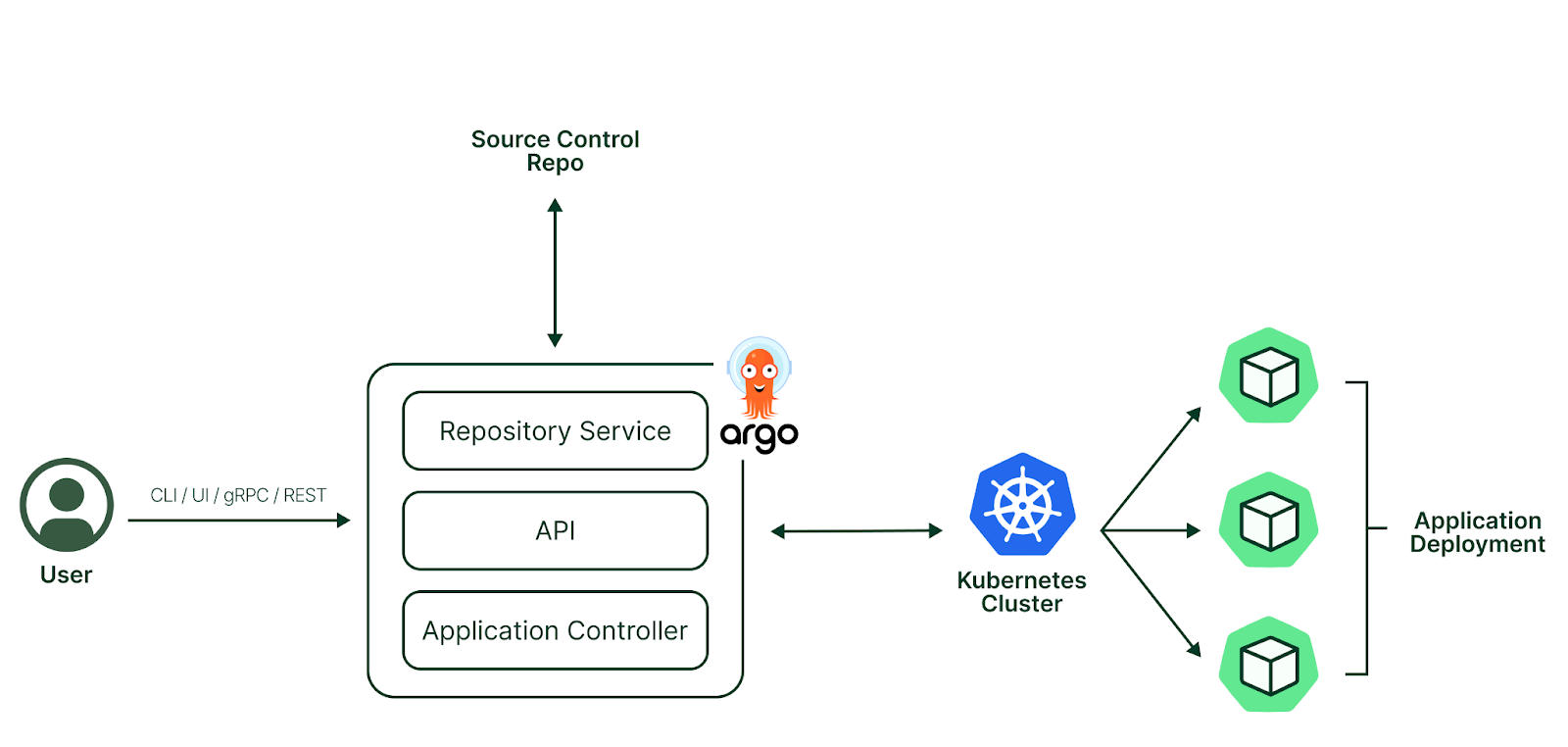
📌 ArgoCD란?
선언적 쿠버네티스 GitOps CD(Continuous Delivery) 도구
- Git 리포지터리를 원천 소스(Source of Truth)로 사용
- 애플리케이션 컨트롤러가 현재 상태와 의도한 상태를 지속적으로 비교하여 자동 동기화
- 구성 드리프트 문제 해결 및 배포 이력 추적 용이
주요 사용 사례
- 배포 자동화: Git 커밋 시 자동으로 클러스터에 반영
- 관찰 가능성: UI/CLI로 동기화 상태 확인 및 알림
- 멀티 테넌시: RBAC 정책으로 여러 클러스터 관리
🔑 핵심 개념
Reconciliation(조정)
- Git 리포지터리의 의도한 상태를 클러스터의 현재 상태와 일치시키는 프로세스
- Helm 차트 → YAML 렌더링 → kubectl apply로 배포 (helm install 사용 안 함)
주요 용어
용어 설명
| 타깃 상태 | Git에 정의된 의도한 상태 |
| 현재 상태 | 클러스터에 배포된 실제 상태 |
| 동기화 상태 | 타깃 상태와 현재 상태의 일치 여부 |
| 동기화(Sync) | 클러스터를 타깃 상태로 변경 |
| 새로고침 | Git과 현재 상태의 차이점 비교 |
| 서비스 상태 | 애플리케이션의 운영 가능 여부 |
🏗️ 아키텍처 (3대 핵심 구성 요소)
1️⃣ API 서버
- Web UI, CLI, CI/CD 시스템과 상호작용
- 역할: 애플리케이션 관리, 인증/SSO, RBAC 정책 강화
2️⃣ 리포지터리 서버
- Git 리포지터리의 로컬 캐시 유지
- 쿠버네티스 매니페스트를 다른 컴포넌트에 제공
3️⃣ 애플리케이션 컨트롤러
- 현재 상태를 지속적으로 모니터링하고 의도한 상태와 비교
- 불일치 시 자동 동기화 수행 (기본 3분 간격)
동기화 트리거 방법
- UI에서 수동 시작
- CLI 사용: argocd app sync myapp
- Webhook 설정 (GitHub, GitLab 등)
📦 핵심 CRD 리소스
Application
클러스터에 배포할 애플리케이션 인스턴스 정의
kind: Application
spec:
  project: default              # 소속 프로젝트
  source:                        # Git 소스 정보
    repoURL: https://...
    chart: nginx
  destination:                   # 배포 대상
    namespace: nginx
    server: <https://kubernetes.default.svc>
AppProject
관련 애플리케이션을 논리적으로 그룹화
- 배포 가능한 Repository / Namespace / Resource 제한 가능
Credentials
Repository Credentials (Secret)
Private Git 리포지터리 접근용
labels:
  argocd.argoproj.io/secret-type: repository
- HTTPS 인증: username/password(PAT)
- SSH 인증: sshPrivateKey
Cluster Credentials (Secret)
멀티 클러스터 환경에서 각각의 클러스터에 접근하기 위한 설정
labels:
  argocd.argoproj.io/secret-type: cluster
- bearerToken과 TLS 인증서 포함
- CLI로도 등록 가능: argocd cluster add CONTEXT_NAME
ArgoCD 설치하기
ArgoCD를 설치하는 방법은 총 4가지 방식이 있다.
- Helm Chart로 설치하기
- Kustomize로 설치하기
- ArgoCLI로 설치하기
- Argo-CD Autopilot으로 설치하기
Helm, Kustomize, CLI 방식은 기존에 많이 사용했었던 방식인데 Autopilot으로 설치하는 것은 해본적이 없어서 Autopoilot으로 설치해서 구성하는 방법에 대해서 작성해볼려고 합니다.
ArgoCD Autopilot이란?
배경
부트스트랩 문제
- Argo CD Application이 동작하려면 → Argo CD가 필요
- 그런데 Argo CD를 배포하려면 → Argo CD Application이 필요
- 순환 참조 문제 발생!
핵심 아이디어
Argo CD가 자기 자신을 GitOps 방식으로 관리
- Autopilot이 초기 부트스트랩을 수행
- 이후 Argo CD가 자신의 배포와 구성을 스스로 관리
🎯 주요 기능
1️⃣ 자동화된 초기 설정
- Argo CD 설치 자동화
- GitOps 환경 초기화
- Git 리포지터리를 구조화된 형태로 자동 구성
2️⃣ 선언적 관리
- 애플리케이션/클러스터를 선언적으로 관리
- Argo CD 수명 주기 전체를 Git으로 관리
3️⃣ 환경 관리
- 여러 환경(dev, staging, prod)에서 애플리케이션 업데이트
- 환경 간 승격(promote) 지원
4️⃣ 재해 복구
- 장애 조치(failover) 클러스터 부트스트랩
- 필요한 모든 유틸리티와 애플리케이션 자동 복구
ArgoCD Autopilot 설치하기
ArgoCD Autopilot CLI 설치하기
brew install argocd-autopilot
# 버전확인
argocd-autopilot version
v0.4.20
Git Token & Repository 준비하기
- https://github.com/settings/tokens 에서 classic 모드로 scope에서 repo 체크 후 토큰 생성을 한다.
- Private 으로 autopilot이라는 Repository를 생성한다.
설치하기
토큰 및 레포 설정하기(토큰 인증방식으므로 https 로 되어 있는 주소를 기입한다.
# 각자 자신의 Git 정보 사용하자
export GIT_TOKEN=<자신의 Git Token>
export GIT_REPO=<자신의 Repo> # 토큰 인증이므로 https로 되어있는 주소를 기입.
부트스트랩 생성하기(아이디, 패스워드는 터미널에서 나오는 값을 참조!)
argocd-autopilot repo bootstrap
# 설치되면 터미널에서 마지막에 패스워드가 나오며 아이디는 admin이다.
INFO running argocd login to initialize argocd config
'admin:login' logged in successfully
Context 'autopilot' updated
INFO argocd initialized. password: hDJIP1Syu5qSZgFJ
INFO run:

    kubectl port-forward -n argocd svc/argocd-server 8080:80

# crd 확인하기
kubectl get crd -n argocd
NAME                          CREATED AT
applications.argoproj.io      2025-11-08T10:49:34Z
applicationsets.argoproj.io   2025-11-08T10:49:34Z
appprojects.argoproj.io       2025-11-08T10:49:34Z

# pod 확인하기
kubectl get pod -n argocd
NAME                                               READY   STATUS    RESTARTS        AGE
argocd-application-controller-0                    1/1     Running   0               2m38s
argocd-applicationset-controller-fc5545556-7b9w8   1/1     Running   0               2m38s
argocd-dex-server-f59c65cff-d9r5g                  1/1     Running   1 (2m17s ago)   2m38s
argocd-notifications-controller-59f6949d7-427cj    1/1     Running   0               2m38s
argocd-redis-75c946f559-drmvz                      1/1     Running   0               2m38s
argocd-repo-server-6959c47c44-jfj58                1/1     Running   0               2m38s
argocd-server-65544f4864-96klq                     1/1     Running   0               2m38s

# 기본 프로젝트 확인
kubectl get appprojects.argoproj.io -n argocd
NAME      AGE
default   2m33s

# 애플리케이션 확인하기
# argo-cd, autopilot-bootstrap, cluster-resources-in-cluster, root이라는 애플리케이션을 자동으로 생성했음을 알 수 있음
kubectl get applications.argoproj.io -n argocd -owide
NAME                           SYNC STATUS   HEALTH STATUS   REVISION                                   PROJECT
argo-cd                        Synced        Healthy         7cce11c26ed4c4ad8ba22ec0e44616716af4ab9b   default
autopilot-bootstrap            Synced        Healthy         7cce11c26ed4c4ad8ba22ec0e44616716af4ab9b   default
cluster-resources-in-cluster   Synced        Healthy         7cce11c26ed4c4ad8ba22ec0e44616716af4ab9b   default
root                           Synced        Healthy         7cce11c26ed4c4ad8ba22ec0e44616716af4ab9b   default
만약 bootstrap을 지정해서 설치하고자 한다면 아래와 같이 배포할 수 있다(따로 bootstrap을 관리하는 경우)
argocd-autopilot repo bootstrap \\
  --repo <https://github.com/your-org/your-repo.git> \\
  --installation-path custom/bootstrap/path
Git 소스확인

실제 Github에 배포 소스가 올라가있고 kustomize로 배포된 것 같다. 버전은 v0.4.20으로 배포되어있다.
디렉터리 구조
- apps : 애플리케이션 디렉터리
- bootstrap : ArgoCD 초기 설정 및 클러스터 리소스
- projects : 환경별 프로젝트 정의
외부 접근을 위해 NodePort 설정하기
autopilot git clone을 한 다음 bootstrap/argo-cd/kustomization.yaml 을 아래와 같이 수정한 후 git commit & push 를 해준다.
autopilot이 ArgoCD 관리를 위해 application을 생성 해놓았기에 argocd-server service의 type을 NodePort로 설정하면 port-forwarding 없이 접근할 수 있다.
apiVersion: kustomize.config.k8s.io/v1beta1
kind: Kustomization
namespace: argocd
resources:
- github.com/argoproj-labs/argocd-autopilot/manifests/base?ref=v0.4.20

patches:
- patch: |-
    apiVersion: v1
    kind: Service
    metadata:
      name: argocd-server
      namespace: argocd
    spec:
      type: NodePort
      ports:
      - name: http
        port: 80
        protocol: TCP
        targetPort: 8080
        nodePort: 30000
  target:
    kind: Service
    name: argocd-server
확인하기
http://localhost:30000 으로 접속하면 아래와 같이 autopilot이 생성한 애플리케이션을 볼 수 있고, ArgoCD 관리도 Git 기반으로 관리함을 볼 수 있다.

ArgoCD Autopilot 구조
📂 Git 리포지터리 디렉토리 구조
Autopilot가 생성하는 GitOps 리포지터리는 3개의 주요 폴더로 구성된다.
gitops-repo/
├── bootstrap/              # Argo CD 자체 관리
├── projects/               # AppProject 정의
└── apps/                   # 실제 애플리케이션 (또는 kustomize/)
🏗️ 1. Bootstrap 폴더
Argo CD 자체를 부트스트랩하고 관리하는 핵심 구조
bootstrap/
├── argo-cd.yaml                    # Argo CD Application 정의
├── cluster-resources.yaml          # 클러스터 리소스 ApplicationSet
├── root.yaml                       # 프로젝트 루트 Application
├── argo-cd/
│   └── kustomization.yaml         # Argo CD 설치 Kustomization
└── cluster-resources/
    ├── in-cluster.json            # 클러스터 정보 (변수)
    └── in-cluster/
        ├── argocd-ns.yaml         # argocd 네임스페이스
        └── README.md
핵심 Application 구조
Autopilot 부트스트랩 후 3개의 Application이 자동 생성
1) autopilot-bootstrap Application
- 역할: 최상위 부모 Application
- 관리 대상: bootstrap/ 디렉토리 전체
- 특징: 클러스터에 직접 apply됨 (Git에 저장 안 됨)
- 나머지 2개 Application을 관리하는 루트
2) argo-cd Application
- 역할: Argo CD 자기 자신을 관리
- 경로: bootstrap/argo-cd/
- 내용: Kustomization을 통해 Argo CD 공식 매니페스트 참조
- # bootstrap/argo-cd/kustomization.yamlresources:- <https://github.com/argoproj-labs/argocd-autopilot/manifests/base?ref=v0.x.x>
3) root Application
- 역할: 모든 프로젝트와 애플리케이션 관리
- 경로: projects/ 디렉토리
- 특징: 부트스트랩 직후에는 DUMMY 파일만 존재
🗂️ 2. Projects 폴더
AppProject와 ApplicationSet을 관리
projects/
├── staging.yaml            # Staging AppProject + ApplicationSet
├── production.yaml         # Production AppProject + ApplicationSet
└── README.md
AppProject 예시
# projects/staging.yaml
apiVersion: argoproj.io/v1alpha1
kind: AppProject
metadata:
  name: staging
spec:
  sourceRepos:
  - '*'
  destinations:
  - namespace: '*'
    server: '<https://kubernetes.default.svc>'
  clusterResourceWhitelist:
  - group: '*'
    kind: '*'
---
apiVersion: argoproj.io/v1alpha1
kind: ApplicationSet
metadata:
  name: staging
spec:
  generators:
  - git:
      repoURL: <https://github.com/user/repo>
      revision: HEAD
      files:
      - path: "apps/**/staging/config.json"
  template:
    # Application 템플릿...
동작 방식
- ApplicationSet의 Git Generator가 apps/*/staging/config.json 파일들을 감지
- 각 파일마다 자동으로 Application 생성
📦 3. Apps 폴더 (또는 Kustomize 폴더)
실제 애플리케이션 매니페스트를 Kustomize 패턴으로 관리
apps/ (또는 kustomize/)
└── my-app/
    ├── base/                       # 기본 매니페스트
    │   ├── deployment.yaml
    │   ├── service.yaml
    │   └── kustomization.yaml
    └── overlays/                   # 환경별 오버레이
        ├── staging/
        │   ├── config.json         # Autopilot 설정
        │   ├── kustomization.yaml  # 환경별 커스터마이징
        │   └── configmap.yaml      # 환경별 추가 리소스
        └── production/
            ├── config.json
            ├── kustomization.yaml
            └── configmap.yaml
config.json 구조
{
  "appName": "my-app",
  "userGivenName": "my-app",
  "destNamespace": "default",
  "destServer": "<https://kubernetes.default.svc>",
  "srcPath": "apps/my-app/overlays/staging",
  "srcRepoURL": "<https://github.com/user/repo>",
  "srcTargetRevision": "HEAD"
}
config.json의 역할:
- ApplicationSet의 Git Generator가 이 파일을 읽음
- 파일 내용이 Application 생성의 파라미터가 됨
- 각 환경마다 다른 설정 적용 가능
🔄 전체 동작 흐름
1. argocd-autopilot repo bootstrap
   ↓
2. K8s 클러스터에 Argo CD 직접 배포
   ↓
3. Git 리포지터리에 구조 생성:
   - bootstrap/
   - projects/ (DUMMY)
   - apps/ (없음)
   ↓
4. autopilot-bootstrap Application을 클러스터에 apply
   ↓
5. autopilot-bootstrap이 argo-cd와 root Application 생성
   ↓
6. Argo CD가 자기 자신을 GitOps로 관리 시작
Phase 2: Project 생성
argocd-autopilot project create staging
   ↓
1. projects/staging.yaml 생성 (AppProject + ApplicationSet)
   ↓
2. Git에 커밋
   ↓
3. root Application이 변경 감지
   ↓
4. staging AppProject와 ApplicationSet 자동 배포
Phase 3: Application 추가
argocd-autopilot app create my-app \\
  --app github.com/user/app-repo \\
  -p staging
argocd-autopilot app create my-app \\
  --app github.com/user/app-repo \\
  -p staging
   ↓
1. apps/my-app/ 구조 생성:
   - base/ (원본 매니페스트)
   - overlays/staging/config.json
   ↓
2. Git에 커밋
   ↓
3. staging ApplicationSet이 config.json 감지
   ↓
4. my-app Application 자동 생성 및 배포
🎯 핵심 패턴 요약
1. App of Apps 패턴
autopilot-bootstrap (최상위)
  ├── argo-cd (자기 관리)
  └── root
      ├── staging (Project)
      │   └── my-app (Application)
      └── production (Project)
          └── my-app (Application)
2. Kustomize Overlay 패턴
- base/: 환경 무관한 기본 리소스
- overlays/: 환경별 커스터마이징 (dev, staging, prod)
3. Git Generator 패턴
- ApplicationSet이 config.json 파일 감지
- 파일 기반 자동 Application 생성
- 선언적 멀티 환경 관리
ArgoCD Autopilot 실습
Proejct, Application 만들기
프로젝트 생성하기
argocd-autopilot project create dev
argocd-autopilot project create prd

# 프로젝트 생성확인
kubectl get appprojects.argoproj.io -n argocd
NAME      AGE
default   52m
dev       7m49s
prd       7m49s
애플리케이션 만들기
https://github.com/argoproj-labs/argocd-autopilot/examples/demo-app 앱을 사용
hellow-world1 app을 dev, prd 프로젝트에 각각 생성한다. 이를 통해 다양한 배포환경에 대한 애플리케이션을 관리 할 수 있다.
argocd-autopilot app create hello-world1 --app github.com/argoproj-labs/argocd-autopilot/examples/demo-app/ -p dev --type kustomize
argocd-autopilot app create hello-world1 --app github.com/argoproj-labs/argocd-autopilot/examples/demo-app/ -p prd --type kustomize

# 애플리케이션 삭제
argocd-autopilot app delete hello-world1 -p prd

# 애플리케이션 확인
kubectl get applications.argoproj.io -n argocd -owide
NAME                           SYNC STATUS   HEALTH STATUS   REVISION                                   PROJECT
argo-cd                        Synced        Healthy         7efcade9f291f724277bda5e923ac5e0aa31e087   default
autopilot-bootstrap            Synced        Healthy         7efcade9f291f724277bda5e923ac5e0aa31e087   default
cluster-resources-in-cluster   Synced        Healthy         7efcade9f291f724277bda5e923ac5e0aa31e087   default
dev-hello-world1               OutOfSync     Healthy         7efcade9f291f724277bda5e923ac5e0aa31e087   dev
prd-hello-world1               OutOfSync     Healthy         7efcade9f291f724277bda5e923ac5e0aa31e087   prd
root                           Synced        Healthy         7efcade9f291f724277bda5e923ac5e0aa31e087   default

# dev와 prd에 나누어서 배포된 앱 확인
kubectl get deploy,pod
NAME                                READY   UP-TO-DATE   AVAILABLE   AGE
deployment.apps/simple-deployment   1/1     1            1           5m8s

NAME                                     READY   STATUS    RESTARTS   AGE
pod/simple-deployment-7854dd65f8-96xq8   1/1     Running   0          5m8s
Git을 확인 해보면 overlays에 두 개의 환경으로 나뉘어져 설정됨을 확인 할 수 있다.

ArgoCD에서는 동일한 애플리케이션이 dev, prd 각각 배포되어 있다.
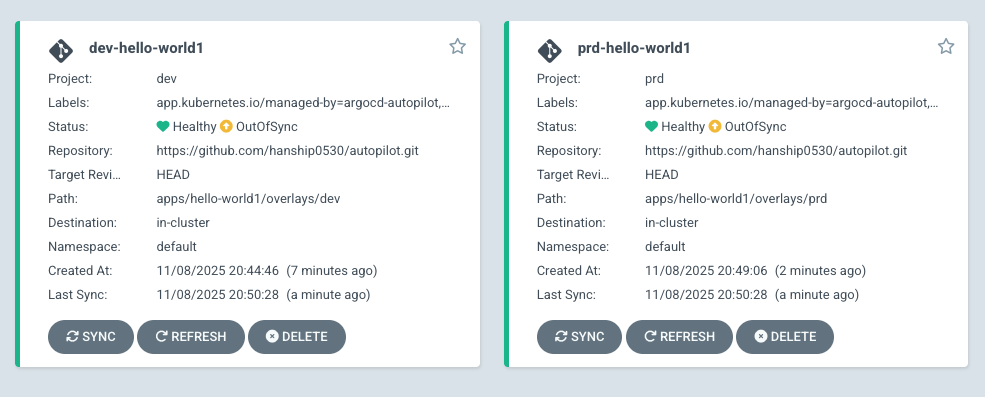
실제 ArgoCD을 Kustomize 패턴으로 Git을 설계하는 과정이 처음에 할려면 어렵고 복잡한데 Autopilot을 이용하면 그러한 설정을 자동으로 해주는 것 같다. 해당 템플릿을 이용해서 Autopilot CLI으로 bootstrap을 만들고 실제 Git을 수정해서 관리하면 초반에 환경구축하는데 좋을 것 같아 보인다.
Blue-Green 배포
Argo Rollouts는 두 개의 서비스를 사용합니다
- Active Service: 현재 프로덕션 트래픽을 받는 서비스
- Preview Service: 새 버전을 테스트하는 서비스
동작과정
초기 상태:
┌─────────────┐
│ Active Svc  │ ──> Blue Pods (v1.0) ──> 사용자 트래픽
└─────────────┘

새 버전 배포:
┌─────────────┐
│ Active Svc  │ ──> Blue Pods (v1.0) ──> 사용자 트래픽
└─────────────┘

┌──────────────┐
│ Preview Svc  │ ──> Green Pods (v2.0) ──> 테스트용 (트래픽 없음)
└──────────────┘

트래픽 전환:
┌─────────────┐
│ Active Svc  │ ──> Green Pods (v2.0) ──> 사용자 트래픽 (전환됨)
└─────────────┘

┌──────────────┐
│ Preview Svc  │ ──> Blue Pods (v1.0) ──> 롤백 대기
└──────────────┘
argo rollout plugin 설치하기
curl -LO <https://github.com/argoproj/argo-rollouts/releases/latest/download/kubectl-argo-rollouts-darwin-arm64>
chmod +x ./kubectl-argo-rollouts-darwin-arm64
sudo mv ./kubectl-argo-rollouts-darwin-arm64 /usr/local/bin/kubectl-argo-rollouts
kubectl argo rollouts version

kubectl-argo-rollouts: v1.8.3+49fa151
  BuildDate: 2025-06-04T22:19:21Z
  GitCommit: 49fa1516cf71672b69e265267da4e1d16e1fe114
  GitTreeState: clean
  GoVersion: go1.23.9
  Compiler: gc
  Platform: darwin/arm64
Rollout 설치하기
blue-green 테스트를 하기 위해서 rollout을 설치해야 한다. 아래의 파일들을 autopilot repo에서 생성하고 commit & push를 한다.
디렉터리는 표시된대로 생성 한 후 진행한다.
bootstrap/argo-rollouts/kustomization.yaml
apiVersion: kustomize.config.k8s.io/v1beta1
kind: Kustomization
namespace: argo-rollouts

resources:
  - <https://github.com/argoproj/argo-rollouts/releases/latest/download/install.yaml>
bootstrap/cluster-resources/in-cluster/argo-rollouts-ns.yaml
apiVersion: v1
kind: Namespace
metadata:
  annotations:
    argocd.argoproj.io/sync-options: Prune=false
  creationTimestamp: null
  name: argo-rollouts
spec: {}
status: {}
bootstrap/argo-rollout.yaml
apiVersion: argoproj.io/v1alpha1
kind: Application
metadata:
  creationTimestamp: null
  labels:
    app.kubernetes.io/managed-by: argocd-autopilot
    app.kubernetes.io/name: argo-rollout
  name: argo-rollout
  namespace: argocd
spec:
  destination:
    namespace: argo-rollouts
    server: <https://kubernetes.default.svc>
  ignoreDifferences:
  - group: argoproj.io
    jsonPointers:
    - /status
    kind: Application
  project: default
  source:
    path: bootstrap/argo-rollouts
    repoURL: ***<본인의 autopilot git 주소>***
  syncPolicy:
    automated:
      allowEmpty: true
      prune: true
      selfHeal: true
    syncOptions:
    - allowEmpty=true
status:
  health: {}
  sourceHydrator: {}
  summary: {}
  sync:
    comparedTo:
      destination: {}
      source:
        repoURL: ""
    status: ""
blue-green applicaion 과 project를 만들어서 배포해본다.
실제 동작할 rollout, application, project를 만든다.
apps/blue-green-demo/blue-green/kustomization.yaml
apiVersion: kustomize.config.k8s.io/v1beta1
kind: Kustomization

resources:
- rollout.yaml
- active-service.yaml
- preview-service.yaml
apps/blue-green-demo/blue-green/active-service.yaml
apiVersion: v1
kind: Service
metadata:
  name: blue-green-demo-active
  namespace: default
spec:
  selector:
    app: blue-green-demo
  type: NodePort
  ports:
  - port: 80
    targetPort: 8080
    protocol: TCP
    name: http
    nodePort: 30002
apps/blue-green-demo/blue-green/preview-service.yaml
apiVersion: v1
kind: Service
metadata:
  name: blue-green-demo-preview
  namespace: default
spec:
  selector:
    app: blue-green-demo
  type: NodePort
  ports:
  - port: 80
    targetPort: 8080
    protocol: TCP
    name: http
    nodePort: 30001
apps/blue-green-demo/blue-green/rollout.yaml
apiVersion: argoproj.io/v1alpha1
kind: Rollout
metadata:
  name: blue-green-demo
  namespace: default
spec:
  replicas: 2
  revisionHistoryLimit: 2
  selector:
    matchLabels:
      app: blue-green-demo
  template:
    metadata:
      labels:
        app: blue-green-demo
    spec:
      containers:
      - name: rollouts-demo
        image: argoproj/rollouts-demo:blue
        imagePullPolicy: Always
        ports:
        - containerPort: 8080
  strategy:
    blueGreen:
      activeService: blue-green-demo-active
      previewService: blue-green-demo-preview
      autoPromotionEnabled: true
      autoPromotionSeconds: 100
projects/blue-green.yaml
apiVersion: argoproj.io/v1alpha1
kind: AppProject
metadata:
  annotations:
    argocd-autopilot.argoproj-labs.io/default-dest-server: <https://kubernetes.default.svc>
    argocd.argoproj.io/sync-options: PruneLast=true
    argocd.argoproj.io/sync-wave: "-2"
  name: blue-green
  namespace: argocd
spec:
  clusterResourceWhitelist:
  - group: '*'
    kind: '*'
  description: blue-green project
  destinations:
  - namespace: '*'
    server: '*'
  namespaceResourceWhitelist:
  - group: '*'
    kind: '*'
  sourceRepos:
  - '*'

---
apiVersion: argoproj.io/v1alpha1
kind: Application
metadata:
  name: blue-green-demo
  namespace: argocd
  labels:
    app.kubernetes.io/managed-by: argocd-autopilot
    app.kubernetes.io/name: blue-green-demo
spec:
  project: blue-green
  source:
    repoURL: ***<본인의 autopilot git 주소>***
    targetRevision: main
    path: apps/blue-green-demo/blue-green
  destination:
    server: <https://kubernetes.default.svc>
    namespace: default
  syncPolicy:
    automated:
      prune: true
      selfHeal: true
    syncOptions:
    - CreateNamespace=true
  ignoreDifferences:
  - group: argoproj.io
    jsonPointers:
    - /status
    kind: Rollout
위 와 같이 만들고 commit & push 를 하면 rollout이 배포됨을 확인 할 수 있다.
배포확인
k get rollouts
NAME              DESIRED   CURRENT   UP-TO-DATE   AVAILABLE   AGE
blue-green-demo   2         2         2            2           56m

k get pods
NAME                               READY   STATUS    RESTARTS   AGE
blue-green-demo-5b4d597cd6-6flz7   1/1     Running   0          26m
blue-green-demo-5b4d597cd6-fmcbr   1/1     Running   0          26m

# rollout 상태 추적
kubectl argo rollouts get rollout blue-green-demo  --watch
블루그린 확인(preview, active 둘다 블루이다)
 |
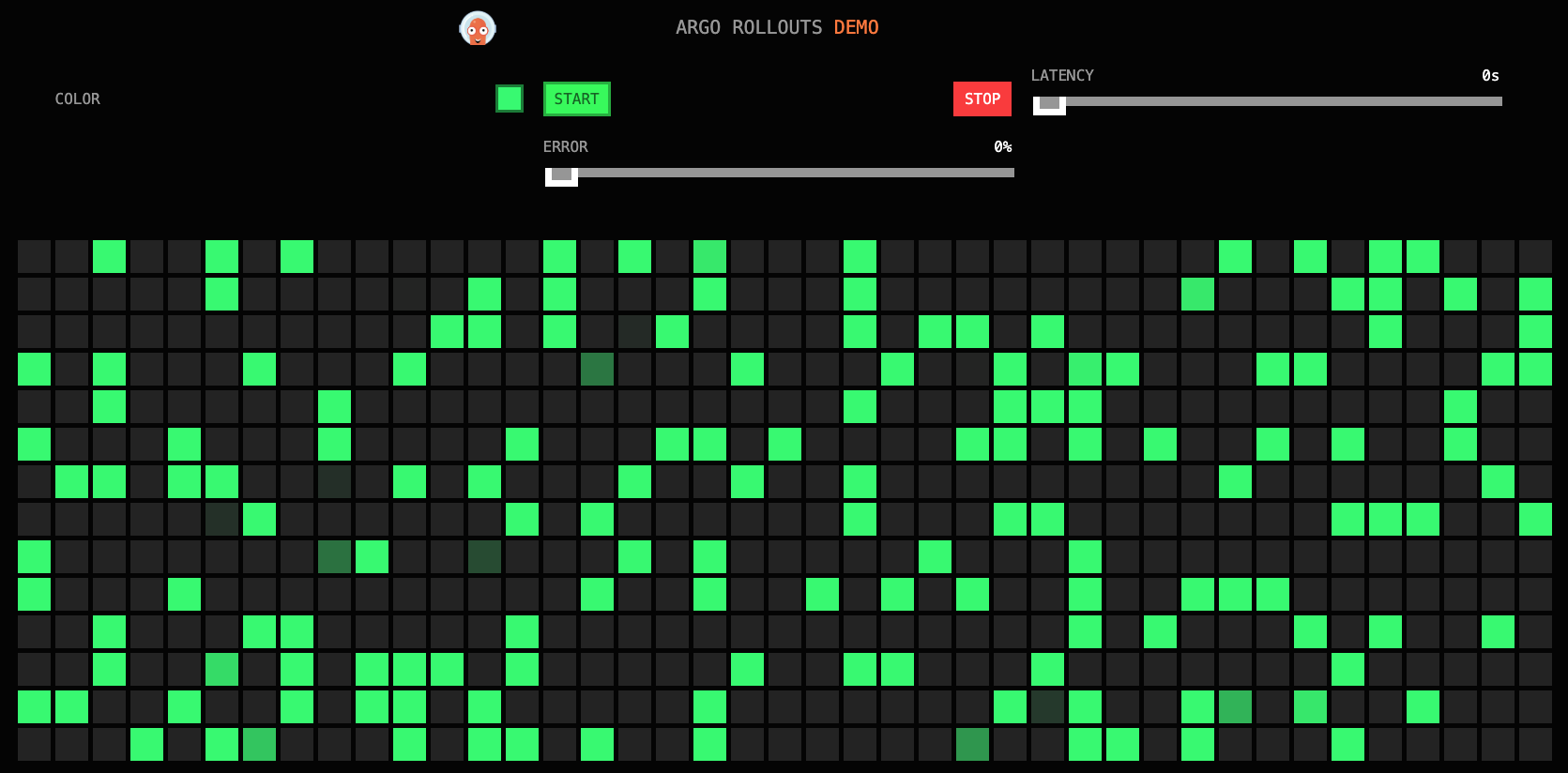 |
| preview localhost:30001 | active localhost:30002 |

그럼 apps/blue-green-demo/blue-green/rollout.yaml 에서 image을 blue 에서 green 으로 변경해본다.
    spec:
      containers:
      - name: rollouts-demo
        image: argoproj/rollouts-demo:green
수정 후 commit & push
green 으로 배포 되면 preview에서는 green 이 active 에서는 blue가 보인다.
 |
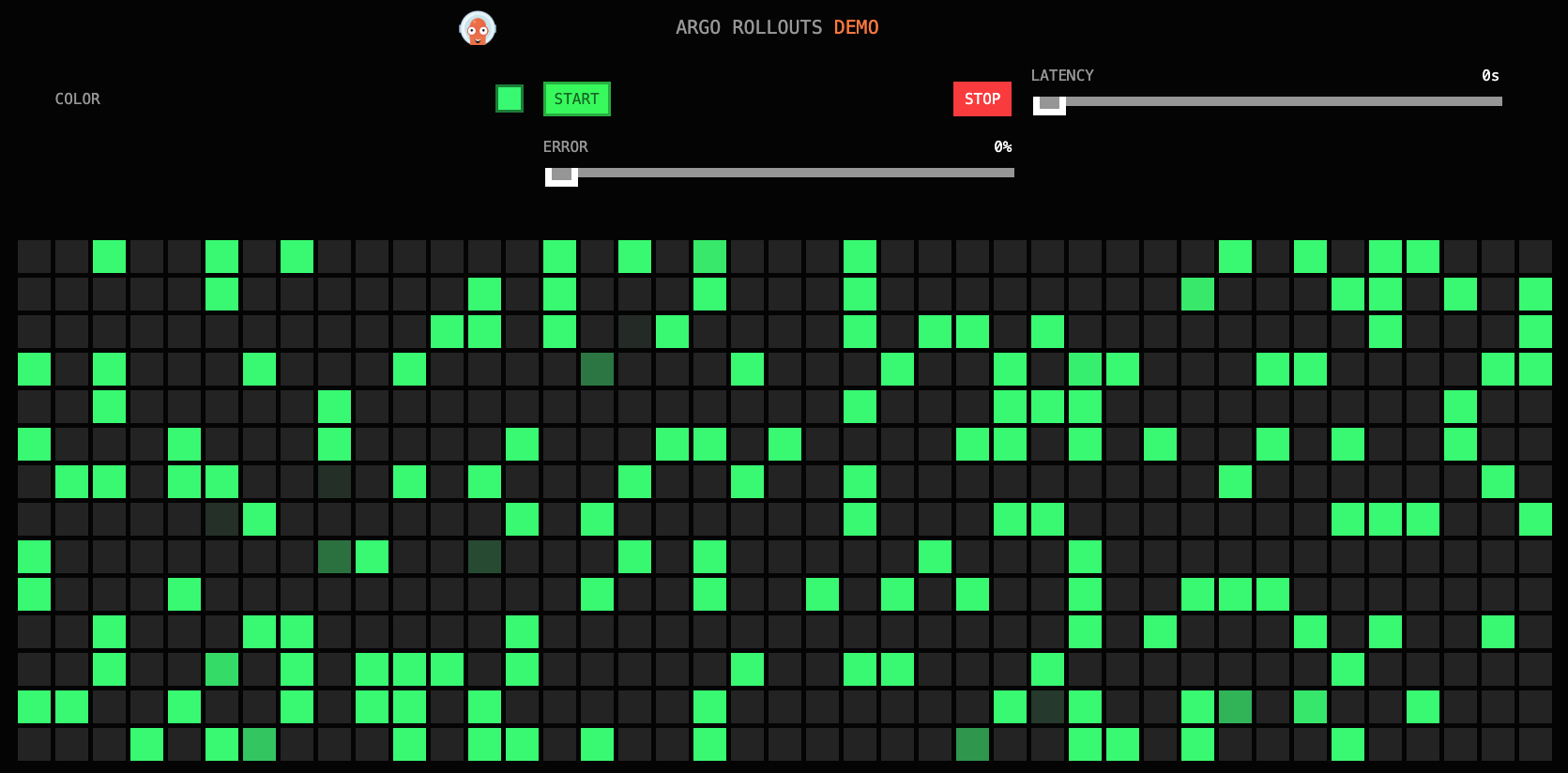 |
| active localhost:30002 | preview localhost:30002 |

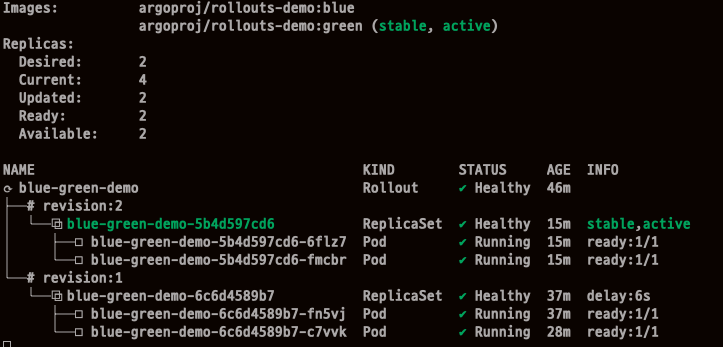
autoPromotionSeconds: 100 로 설정했기에 100초 이후 preview, active 둘 다 green 으로 변경됨을 확인 할 수 있다.
ArgoCD HA 구성하기
ArgoCD를 실제 Production에서 운영하기 위해서 HA를 설정해서 운영을 해야하는데 그 과정에 대해서 다뤄본다. 상세설명
- Argo CD HA의 핵심은 Controller, Repo-server, Server 3대 구성요소를 다중화 + Redis HA 구성
- Redis HA는 Sentinel + HAProxy 로 장애 시 자동 failover
- Controller는 Leader Election으로 1개만 active, 나머지는 standby
- Repo-server / Server는 수평 확장으로 부하 분산
- 모든 구성요소는 Argo CD CRD(Application)를 watch하여 자동 GitOps 수행
설치하기
사전에 argocd-ha 라는 Private Github Repository를 생성하고 clone 한 후 진행한다.
git clone <자신의 Github Repo 주소>
cd argocd-ha
mkdir resources

cat << EOF > resources/namespace.yaml
apiVersion: v1
kind: Namespace
metadata:
  name: argocd
EOF

kubectl apply -f resources/namespace.yaml
wget <https://raw.githubusercontent.com/argoproj/argo-cd/refs/heads/master/manifests/ha/install.yaml>
mv install.yaml resources/
kubectl apply -f resources/install.yaml -n argocd

# 확인
watch -d kubectl get pod -n argocd

# 비밀번호 확인
kubectl get secret -n argocd argocd-initial-admin-secret -o jsonpath='{.data.password}' | base64 -d ; echo
LGKo7EJ1e08v1fdM

# NodePort 수정
apiVersion: v1
kind: Service
metadata:
  labels:
    app.kubernetes.io/component: server
    app.kubernetes.io/name: argocd-server
    app.kubernetes.io/part-of: argocd
  name: argocd-server
spec:
  type: NodePort
  ports:
  - name: http
    port: 80
    protocol: TCP
    targetPort: 8080
    nodePort: 30000
  - name: https
    port: 443
    protocol: TCP
    targetPort: 8080
  selector:
    app.kubernetes.io/name: argocd-server

# 원격 리포지터리에 커밋하고 푸시한다.
git add . && git commit -m "Deploy Argo CD " && git push -u origin main
ArgoCD 자체 관리
ArgoCD 배포 이후 ArgoCD 자기 자신을 GItOps로 관리할 수 있는 기능을 제공한다.
- Argo CD UI → Settings → Repo 에 자신의 Repo 추가
- ArgoCD 애플리케이션 생성
- cat <* targetRevision: main syncPolicy: automated: {} destination: namespace: argocd server: <https://kubernetes.default.svc> EOF # 확인하기 kubectl get applications.argoproj.io -n argocd -owide NAME SYNC STATUS HEALTH STATUS REVISION PROJECT argocd Synced Healthy e8d0e07367cc648be4de0b9d7f5d12f204f20644 default
Argo CD 설정 변경
- networkpolicy 를 삭제 한 후 실제로 반영이 이루어지는 지 확인해보자.
- install.yaml 에서 networkpolicy 관련 설정들을 삭제하고 Push 한다.
- Push 이후 ArgoCD UI에서 Prune 설정을 켜고(install.yaml 에서 설정가능) Sync 된 것을(180초 이후) 확인 하며 삭제된 것을 볼 수 있다.
# 배포된 networkpolicy
kubectl get networkpolicies.networking.k8s.io -n argocd
NAME                                              POD-SELECTOR                                              AGE
argocd-application-controller-network-policy      app.kubernetes.io/name=argocd-application-controller      40m
argocd-applicationset-controller-network-policy   app.kubernetes.io/name=argocd-applicationset-controller   40m
argocd-dex-server-network-policy                  app.kubernetes.io/name=argocd-dex-server                  40m
argocd-notifications-controller-network-policy    app.kubernetes.io/name=argocd-notifications-controller    40m
argocd-redis-ha-proxy-network-policy              app.kubernetes.io/name=argocd-redis-ha-haproxy            40m
argocd-redis-ha-server-network-policy             app.kubernetes.io/name=argocd-redis-ha                    40m
argocd-repo-server-network-policy                 app.kubernetes.io/name=argocd-repo-server                 40m
argocd-server-network-policy                      app.kubernetes.io/name=argocd-server                      40m

# 삭제 후 확인
kubectl get networkpolicies.networking.k8s.io -n argocd
No resources found in argocd namespace.
관찰 가능성
kube-prometheus-stack 설치
# repo 추가
helm repo add prometheus-community <https://prometheus-community.github.io/helm-charts>

# 파라미터 파일 생성
cat < monitor-values.yaml
prometheus:
  prometheusSpec:
    scrapeInterval: "15s"
    evaluationInterval: "15s"
  service:
    type: NodePort
    nodePort: 30002

grafana:
  defaultDashboardsTimezone: Asia/Seoul
  adminPassword: prom-operator
  service:
    type: NodePort
    nodePort: 30003

alertmanager:
  enabled: false
defaultRules:
  create: false
prometheus-windows-exporter:
  prometheus:
    monitor:
      enabled: false
EOT
cat monitor-values.yaml

# 배포
helm install kube-prometheus-stack prometheus-community/kube-prometheus-stack --version 75.15.1 \\
-f monitor-values.yaml --create-namespace --namespace monitoring

# 각각 웹 접속 실행
open  # Prometheus
open  # Grafana

# 확인
## grafana : 프로메테우스는 메트릭 정보를 저장하는 용도로 사용하며, 그라파나로 시각화 처리
## prometheus-0 : 모니터링 대상이 되는 파드는 ‘exporter’라는 별도의 사이드카 형식의 파드에서 모니터링 메트릭을 노출, pull 방식으로 가져와 내부의 시계열 데이터베이스에 저장
## node-exporter : 노드익스포터는 물리 노드에 대한 자원 사용량(네트워크, 스토리지 등 전체) 정보를 메트릭 형태로 변경하여 노출
## operator : 시스템 경고 메시지 정책(prometheus rule), 애플리케이션 모니터링 대상 추가 등의 작업을 편리하게 할수 있게 CRD 지원
## kube-state-metrics : 쿠버네티스의 클러스터의 상태(kube-state)를 메트릭으로 변환하는 파드
helm list -n monitoring
kubectl get pod,svc,ingress,pvc -n monitoring
kubectl get-all -n monitoring
kubectl get prometheus,servicemonitors -n monitoring
~~~~kubectl get crd | grep monitoring

# 프로메테우스 버전 확인
kubectl exec -it sts/prometheus-kube-prometheus-stack-prometheus -n monitoring -c prometheus -- prometheus --version

# 프로메테우스 리소스 정보 확인
kubectl get prometheuses.monitoring.coreos.com -n monitoring
kubectl get prometheuses.monitoring.coreos.com -n monitoring -o yaml | k neat | yq

serviceMonitorSelector 의 Label 이 일치해야 모니터링 정보를 가져올 수 있다.
  serviceMonitorSelector:
    matchLabels:
      release: kube-prometheus-stack
Argo CD 구성요소에 대한 ServiceMonitor 생성
Prometheus Operator의 CRD로, 쿠버네티스 서비스의 메트릭을 자동으로 수집하도록 설정
Argo CD 메트릭 엔드포인트
컴포넌트 Service 이름 포트 메트릭 경로
| Application Controller | argocd-metrics | 8082 | /metrics |
| Server | argocd-server-metrics | 8083 | /metrics |
| Repo Server | argocd-repo-server | 8084 | /metrics |
| ApplicationSet Controller | argocd-applicationset-controller | 8080 | /metrics |
| Dex Server | argocd-dex-server | 5558 | /metrics |
| Redis HAProxy | argocd-redis-ha-haproxy | 9101 | /metrics |
| Notifications Controller | argocd-notifications-controller-metrics | 9001 | /metrics |
# 테스트용 파드 기동
cat <<EOF | kubectl apply -f -
apiVersion: v1
kind: Pod
metadata:
  name: nginx
  labels:
    app: nginx
spec:
  containers:
  - name: nginx
    image: nginx:alpine
    ports:
    - containerPort: 80
EOF

# application-controller 메트릭 호출
kubectl exec -it -n default nginx -- curl argocd-metrics.argocd.svc:8082/metrics
...

# 추적 argocd-metrics 이 실제 수집하는 곳은?
# endpoints/argocd-metrics 를 수집
kubectl get svc,ep -n argocd -l app.kubernetes.io/name=argocd-metrics
NAME                     TYPE        CLUSTER-IP      EXTERNAL-IP   PORT(S)    AGE
service/argocd-metrics   ClusterIP   10.96.203.215   <none>        8082/TCP   82m

NAME                       ENDPOINTS          AGE
endpoints/argocd-metrics   10.244.2.22:8082   82m

# endpoints/argocd-metrics 조회 시 argocd-application-controller 를 바라봄
kubectl get svc -n argocd argocd-metrics -o yaml | k neat | yq
...
  ports:
    - name: metrics
      port: 8082
  selector:
    app.kubernetes.io/name: argocd-application-controller

# argocd-application-controller 확인
kubectl get pod -n argocd -l app.kubernetes.io/name=argocd-application-controller
NAME                              READY   STATUS    RESTARTS   AGE
argocd-application-controller-0   1/1     Running   0          109m

# ServiceMonitor 생성
cat <<EOF | kubectl apply -f -
apiVersion: monitoring.coreos.com/v1
kind: ServiceMonitor
metadata:
  name: argocd-metrics
  namespace: monitoring
  labels:
    release: kube-prometheus-stack
spec:
  selector:
    matchLabels:
      app.kubernetes.io/name: argocd-metrics
  endpoints:
    - port: metrics
  namespaceSelector:
    matchNames:
      - argocd
EOF

# argocd-server 메트릭 호출
kubectl exec -it -n default nginx -- curl argocd-server-metrics.argocd.svc:8083/metrics
...

# argocd service 중에 argocd-server-metrics label을 가지고 있는
k get svc,ep -n argocd -l app.kubernetes.io/name=argocd-server-metrics
NAME                            TYPE        CLUSTER-IP   EXTERNAL-IP   PORT(S)    AGE
service/argocd-server-metrics   ClusterIP   10.96.1.83   <none>        8083/TCP   72m

NAME                              ENDPOINTS                         AGE
endpoints/argocd-server-metrics   10.244.1.5:8083,10.244.3.4:8083   72m

k get svc -n argocd argocd-server-metrics -o yaml | k neat | yq
...
  ports:
    - name: metrics
      port: 8083
  selector:
    app.kubernetes.io/name: argocd-server

kubectl get pod -n argocd -l app.kubernetes.io/name=argocd-server
NAME                            READY   STATUS    RESTARTS   AGE
argocd-server-8b767f58c-pd2dj   1/1     Running   0          92m
argocd-server-8b767f58c-qwk7z   1/1     Running   0          92m

# ServiceMonitor 생성
# release: kube-prometheus-stack 값이 serviceMonitorSelector 와 일치해야 수집이 가능하다.
cat <<EOF | kubectl apply -f -
apiVersion: monitoring.coreos.com/v1
kind: ServiceMonitor
metadata:
  name: argocd-server-metrics
  namespace: monitoring
  labels:
    release: kube-prometheus-stack
spec:
  selector:
    matchLabels:
      app.kubernetes.io/name: argocd-server-metrics
  endpoints:
    - port: metrics
  namespaceSelector:
    matchNames:
      - argocd
EOF

# repo-server 메트릭 호출
kubectl exec -it -n default nginx -- curl argocd-repo-server.argocd.svc:8084/metrics
...

# ServiceMonitor 생성
cat <<EOF | kubectl apply -f -
apiVersion: monitoring.coreos.com/v1
kind: ServiceMonitor
metadata:
  name: argocd-repo-server-metrics
  namespace: monitoring
  labels:
    release: kube-prometheus-stack
spec:
  selector:
    matchLabels:
      app.kubernetes.io/name: argocd-repo-server
  endpoints:
    - port: metrics
  namespaceSelector:
    matchNames:
      - argocd
EOF

# 나머지 ServiceMonitor 생성
cat <<EOF | kubectl apply -f -
apiVersion: monitoring.coreos.com/v1
kind: ServiceMonitor
metadata:
  name: argocd-applicationset-controller-metrics
  namespace: monitoring
  labels:
    release: kube-prometheus-stack
spec:
  selector:
    matchLabels:
      app.kubernetes.io/name: argocd-applicationset-controller
  endpoints:
    - port: metrics
  namespaceSelector:
    matchNames:
      - argocd
---
apiVersion: monitoring.coreos.com/v1
kind: ServiceMonitor
metadata:
  name: argocd-dex-server
  namespace: monitoring
  labels:
    release: kube-prometheus-stack
spec:
  selector:
    matchLabels:
      app.kubernetes.io/name: argocd-dex-server
  endpoints:
    - port: metrics
  namespaceSelector:
    matchNames:
      - argocd
---
apiVersion: monitoring.coreos.com/v1
kind: ServiceMonitor
metadata:
  name: argocd-redis-haproxy-metrics
  namespace: monitoring
  labels:
    release: kube-prometheus-stack
spec:
  selector:
    matchLabels:
      app.kubernetes.io/name: argocd-redis-ha-haproxy
  endpoints:
    - port: http-exporter-port
  namespaceSelector:
    matchNames:
      - argocd
---
apiVersion: monitoring.coreos.com/v1
kind: ServiceMonitor
metadata:
  name: argocd-notifications-controller
  namespace: monitoring
  labels:
    release: kube-prometheus-stack
spec:
  selector:
    matchLabels:
      app.kubernetes.io/name: argocd-notifications-controller-metrics
  endpoints:
    - port: metrics
  namespaceSelector:
    matchNames:
      - argocd
EOF

# 나머지 확인
kubectl get servicemonitors -n monitoring | grep argocd
argocd-applicationset-controller-metrics         7m52s
argocd-dex-server                                7m52s
argocd-notifications-controller                  7m52s
argocd-redis-haproxy-metrics                     7m52s
argocd-repo-server-metrics                       8m
argocd-server-metrics                            8m19s
Grafana Application 생성 후 확인
# guestbook helm 차트 애플리케이션 생성
cat <https://github.com/argoproj/argocd-example-apps>
    targetRevision: HEAD
  syncPolicy:
    automated:
      enabled: true
      prune: true
      selfHeal: true
    syncOptions:
    - CreateNamespace=true
  destination:
    namespace: guestbook
    server: <https://kubernetes.default.svc>
EOF
- 그라파나 웹 접속 후 대시보드 Import → https://github.com/argoproj/argo-cd/blob/master/examples/dashboard.json 코드 내용 복사 후 추가
'스터디 > [gasida] ci-cd 스터디 1기' 카테고리의 다른 글
| OpenLDAP + KeyCloak + Argo CD + Jenkins (0) | 2025.11.23 |
|---|---|
| ArgoCD ApplicationSet (0) | 2025.11.23 |
| Arocd Rollout (0) | 2025.11.16 |
| ArgoCD + Ingress + Self Managed (0) | 2025.11.16 |
| 3주차: Jenkins + ArgoCD (0) | 2025.11.01 |